
Someone tried to sell me a $28,000 platform last year that could apparently do everything. I asked them to show me an AVETMISS export. They said their integration partner handled it. That's when I knew they'd never spoken to an RTO in their life. That conversation is the LMS vs SMS question in disguise, and almost nobody answers it straight.
If you've been in this sector for a while, or you've just registered, you've had a version of that conversation. Someone says "you need an LMS and an SMS," you nod, they quote you five figures, and you nod again. And a year later you're still doing your reporting in a spreadsheet at 9pm.
Here is the plain-English version. No jargon, no sales.
LMS vs SMS: the one-line answer
An LMS is where students learn. An SMS is where you keep track of them.
Most RTOs need both. Most software makes you buy them separately and stitch them together yourself. That's where the pain begins.
What does LMS stand for?
Learning Management System.
The learner logs into it, gets their content, submits their work, sees their progress, and gets their feedback. It's the online classroom.
Outside VET, you'll hear about Moodle, Canvas, Blackboard, and Google Classroom. Inside VET, Cloud Assess, aXcelerate's learning module, and a scatter of smaller players. The problem is that the general LMS tools weren't built for AVETMISS or ASQA, and the VET-specific ones bolted the learner side onto systems that started life as something else.
An LMS on its own doesn't know your student's USI. It doesn't produce AVETMISS files. It doesn't handle enrolment or payment. It's just where the training happens.
What does RTO mean in education?
Registered Training Organisation.
In Australia, an RTO is a training provider formally registered with the national regulator — ASQA in most cases, or the state regulator in Victoria and Western Australia. Being an RTO means you can issue nationally recognised qualifications and statements of attainment. Anyone can teach. Only an RTO can issue nationally recognised training. That's the whole distinction.
Being an RTO also means you're bound by the ASQA Standards, you report to NCVER through AVETMISS, and you hold specific records for specific timeframes. It's a lot more paperwork than most people realise before they register.
What does RTO management mean?
Every normal business has sales, marketing, finance, and staff. RTO management is that, plus a layer that only exists in this sector.
That layer covers trainer currency records, validation and moderation, mapping assessments to units of competency, quarterly AVETMISS reporting, USI verification, student handbooks, pre-enrolment info, ASQA Standards compliance, and audit prep.
Every RTO has someone doing this work. They might be called an RTO Manager, Compliance Manager, or Training Manager. More often they're the person who put their hand up when nobody else would.
The software that gets called "RTO management software" usually means the SMS side of things. Some tools cover both LMS and SMS. RTO Grow does, which is why we generally just say "RTO platform" and skip the acronym.
What LMS does TAFE use?
It varies. Mostly Blackboard and Canvas across the states. Some campuses run Moodle for specific programs. A few use custom platforms layered on top.
TAFEs also run enterprise-grade student management systems. Ellucian Banner, or state government custom builds. Millions to run. Teams of IT staff. Not a realistic model for a private RTO.
The reason TAFE tooling matters to smaller providers isn't that you'd copy it. It's that a lot of trainers come from TAFE backgrounds and expect certain features. If your team keeps saying "in Canvas we used to be able to..." that's why.
What is an LMS example?
Sticking to Australian VET, the names you'll hear most:
aXcelerate. Combined LMS and SMS. The oldest player, and the biggest market share in the sector. Most people mean aXcelerate when they say "the big one."
Cloud Assess. LMS-focused with SMS features layered in. Assessment-first. Common in trades and short courses.
eSkilled. Newer, competitive on price. LMS with SMS bolted on.
Moodle for Vocational. Open-source Moodle, adapted with plugins. Popular with tech-savvy RTOs or those with in-house developers.
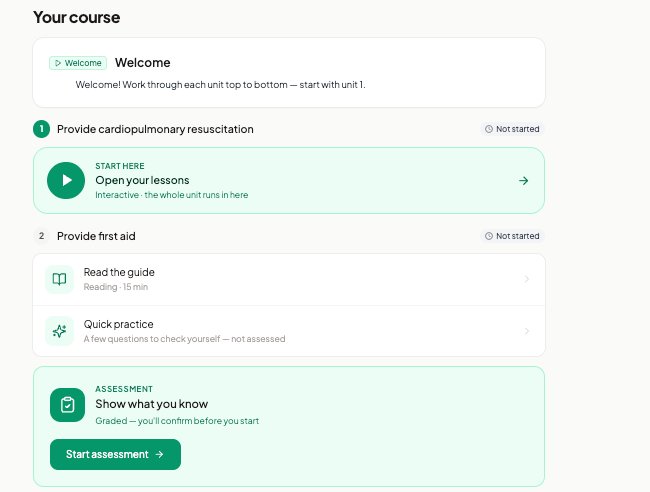
RTO Grow. LMS and SMS in one platform, designed for how an RTO actually runs. AVETMISS reporting as a byproduct of normal work, not a quarterly project. And the bit no other player does. RTO Grow builds proper course content for you, pulled straight from the unit outcomes on training.gov.au, including gamified Duolingo-style scenarios you can drop into any lesson. All editable. If you're not a coder, you can still run fully gamified courses and change them whenever you want.
If you want the longer version of this list, we keep an honest comparison of the major SMS and LMS platforms updated separately.
Whatever you're evaluating, don't just watch the demo. Sit down and try to do a Tuesday in it. Enrol a student on a superseded code. Mark an assessment. Pull an AVETMISS file. See what falls over.
The bit nobody else does: content that builds itself
Most LMS platforms give you a place to upload content. That's it. You still have to write the learner guide, build the assessments, map everything to the unit outcomes, and if you want the course to feel modern, hire someone to gamify it. That's weeks of work per unit, or thousands of dollars per course to outsource.
RTO Grow pulls the elements and performance criteria directly from training.gov.au and builds the content around them. Learner guides. Knowledge assessments. Observation checklists. Gamified scenarios in the Duolingo style, so students actually want to open the course instead of closing a PDF after page two.
Every bit of it is editable. You are not stuck with what the system generated. If you don't like a question, change it. If you want to add a scenario, add one. If you want to swap the branding, swap it. You don't need to code. You don't need a developer. You need about five minutes and something to say.
This is the piece that changes what "buying an LMS" actually means. You're not buying an empty container that you fill in yourself over the next six months. You're buying a platform that has your first draft ready before you finish setting up your account. Then you make it yours.
For most RTOs I talk to, this is the single biggest time saver. Content creation is the bottleneck that stops new courses launching and old courses being updated. Removing that bottleneck is what lets a smaller RTO run like a bigger one.
What does a Student Management System do?
An SMS holds the operational and compliance records of your RTO. That's the theory.
In practice, a good SMS is doing all of this:
- Capturing enrolment data — personal details, USI, course, payment
- Verifying USIs against the government portal
- Recording which units and courses each student is enrolled in
- Tracking payment status, invoices, and outstanding balances
- Storing assessment results and marking competency
- Managing trainer records — qualifications, currency, unit authorisations
- Producing certificates and statements of attainment
- Generating AVETMISS-compliant NAT files
- Holding audit-ready records of everything
An SMS is where compliance lives. An LMS is where learning lives. The pain in most RTOs comes from the fact that these two systems don't talk to each other. A trainer marks a student competent in the LMS, and the SMS doesn't know until someone updates it by hand.
Multiply that gap by every student, every unit, every course. That's where the weekends go.
What is the best student management system?
Depends on how your RTO runs. Here's what to look for instead of a name.
- Enters the student once. One gateway. Everything downstream already knows who they are. No re-keying, no duplicate records, no manual data transport.
- Produces AVETMISS as a byproduct, not a project. If your quarterly reporting takes two weeks and involves rebuilding files by hand, your system is wrong. The data required for AVETMISS is data you already collect at enrolment. A properly built SMS produces the NAT files at the click of a button.
- Handles supersession without a spreadsheet. When a code gets superseded, students mid-qualification need to land safely on either the old version or the new one. If your system can't model that, someone opens a spreadsheet at 9pm.
- Holds one course sold many ways. Face-to-face, online, blended, RPL, traineeship. Different prices, different schedules. A good SMS treats them as variations of one course. A bad one treats them as five separate courses that all need updating whenever the training package changes.
- Verifies USIs automatically. USI verification is a legal requirement and it's fully automatable through the government's web services. If you're still doing it manually, your system is behind.
- Records the audit trail as you work. Every action, every change, every assessment. Logged in the background. When audit time comes, you export what already exists. You don't rebuild it.
- Doesn't hold your data hostage. One-click export. Your data is yours. If you want to leave, you leave with everything.
- Is fast to onboard. Weeks, not months. Five business days is achievable if the system was designed for it. Two months is a red flag no matter how impressive the demo looked.
If a platform ticks all of these, it doesn't really matter what it's called. If it ticks half, you'll be doing the other half by hand forever.
So what should you actually get?
If your RTO is small or new, you need both an LMS and an SMS. Get them in one platform. Trying to integrate two separate tools is where most of the pain in this sector lives.
If your RTO is established and already on separate systems, the integration cost is the biggest hidden cost in your business. Every hour a staff member spends moving data between platforms is a real dollar cost. Add it up over a year. It usually pays for the switch three times over.
If your RTO is TAFE-scale, you have IT teams and enterprise budgets. This post isn't for you.
For everyone else. Don't pay $10,000 upfront for onboarding. Don't sign a three-year contract. Don't tolerate a two-month setup. Don't buy the "we'll build our own" pitch from a non-software company. Building an LMS/SMS properly is a real engineering job, and the RTOs I've watched go down that road have almost all regretted it.
The best system is the one your team forgets they're using. The enrolment flows through, the assessments get marked, the reports produce themselves, and everyone gets to focus on what they signed up for. Training people. Not feeding software.
Book a 15-minute walkthrough and bring your own unit codes. We'll do a Tuesday in it.